

| Home | Press | Mailing Lists | Documentation | Screenshots | People | SourceForge | Downloads |
Creative Mac Step-by-Step Install Instructions
Film Gimp had been a tool used only by the select few inside Hollywood motion picture studios. Although Film Gimp has existed since 1998 hidden in CVS, it wasn't until the Film Gimp project was publically launched on SourceForge on July 4th, 2002, that there was a public release. At that time the package was rough in some ways, as you may expect with software that is only used internally. Thanks to the work of the extraordinary Film Gimp development team we are now at release 15. Release 10 was our first release to support the Macintosh.
Our current version of Mac Film Gimp relies upon Fink and X11. We're working on an Aqua version Film Gimp. Fink isn't too difficult to install, although you may need to follow their directions carefully. Film Gimp is in the 'stable' projects list in Fink.
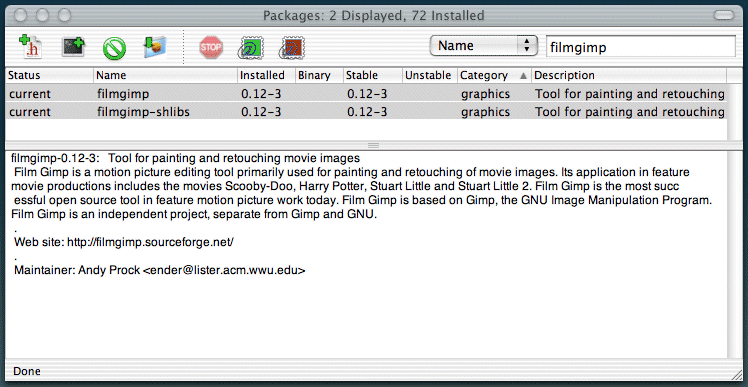
Run this installer.
This is a small FAQ dealing with the common installation problems Mac users have had when installing Film Gimp. Some of this information is borrowed from the fink FAQ.
Hi there,
filmgimp sounds fantastic and I'd love to try it out, but I
can't get
past the installer. I've downloaded MacFilmGimp-0.15-1 from macupdate
and can run the installer app. It then asks for my password, and
complains I don't have admin privs - but I do! I have even tried
starting the installer app via sudo from the shell, and the same
thing
happens. Sorry to bug you with this, but I can't think of anything
else
to try.
Best regards,
Johan
From Dave:
I had the same problem with the installer. After running it
six times,
the solution was to type my password very slowly. You get a spinning
cursor when you're entering the password with this particular
installer, which might indicate that a keystroke or two in your
password isn't being recorded. (By the way, this only happened
on one
of my Macs, a PowerBook 1 GHz; the other two Macs, both desktop
models
with third-party keyboards, didn't have this problem.)
Incidentally, installing this on the Mac, you must first install
XDarwin and a little updater to go along with it. For some reason
X11
by itself doesn't include the right components for a proper compile.
Complete instructions, with links to downloads, are at
http://www.creativemac.com/cgi-bin/getframeletter.cgi?/2003/01_jan/
tutorials/filmgimpx11030109.htm .
Dave Nagel
--------------------------------------------------
http://www.creativemac.com
http://www.dmnforums.com
From Andy:
This is your normal password. If you have Administrator enabled
for
your user, it'll be the one you use for 'sudo', so I'm not sure
why
you'd have any trouble with it. I'm using Apple's built in password
dialog box and can't change it, but I'll get to work on cleaning
up
those error messages.
To manually install Film Gimp try this:
In the Terminal:
1) sudo fink selfupdate-cvs
2) sudo cp
/sw/fink/10.2/unstable/main/finkinfo/graphics/filmgimp-0.10-3*
/sw/fink/10.2/local/main/finkinfo
3) sudo fink install filmgimp
Q: A configure script complains that it can't find an "acceptable cc". What's that?
A: You must install the Developer Tools. Install the Developer.pkg package from the Developer Tools CD, or download it from Apple at http://developer.apple.com/tools/.
Q: I'm getting a message that says "Can't resolve dependency "lib..." for package "filmgimp-0.10-3". What should I do?
A: You need to update fink. In the Terminal type: 'sudo fink selfupdate' and when that is done 'sudo fink update-all'. Then, to install Film Gimp, type 'sudo fink install filmgimp', or rerun MacFilmGimp to do this automatically.
Q: I'm getting lots of messages like "locale not supported by C library", Is that bad?
A: It's not bad, it just means that the program will use the default English messages, date formats, etc. The program will function normally otherwise. The Running X11 document has details.
Q: Do you know where to get the Fink dmg installer?
A: You can get it at
http://telia.dl.sourceforge.net/sourceforge/fink/Fink-0.5.0a-
Installer.dmg. And OroborOSX at
http://oroborosx.sourceforge.net/OroborOSX-v0.8b2.tar.gz.
Q: Who can I ask about XDarwin?
The XonX page is here:
http://mrcla.com/XonX/
The XonX sourceforge project is here:
http://sourceforge.net/projects/xonx/
The lead developer is Torrey Lyons. (E-mail links available from above pages.)
Other useful FAQs
Fink FAQ
http://fink.sourceforge.net/faq/index.php
OroborOSX FAQ
http://oroborosx.sourceforge.net/faq.html
More Information on Film Gimp
You can find more information on the Film Gimp website at
http://www.filmgimp.org.
Questions and comments are best directed to the filmgimp-developer
mailing list at
http://sourceforge.net/mail/?group_id=57007
1) Install Fink 0.50a
o Double-click Fink-0.50a-Installer.dmg to mount it.
o Open the "Fink 0.50a Installer" disk icon that appears
on your desktop after Disk copy has verified the file.
o Double-click the installer package inside and follow the instructions
on screen.
2) Install the Film Gimp Required Libraries
o Double-click FilmGimpRequiredLibraries.pkg and follow the instructions
on screen.
3) Install and Run MacFilmGimp
o Double-click MacFilmGimp-0.10-4.dmg.gz, Stuffit Expander should
expand the archive for you.
o Open the "MacFilmGimp" disk icon that appears on your
desktop after Disk copy has verified the file.
o Drag the MacFilmGimp icon to your Applications Folder.
o Double-click the MacFilmGimp icon and follow the instructions
on screen.
4) Install the OroborOSX Window Manager
o Double-click OroborOSX-v0.8b2.tar.gz and Stuffit Expander should
expand the archive for you.
o Drag the OroborOSX-Folder to your Applications Folder.
5) Launch Film Gimp via MacFilmGimp
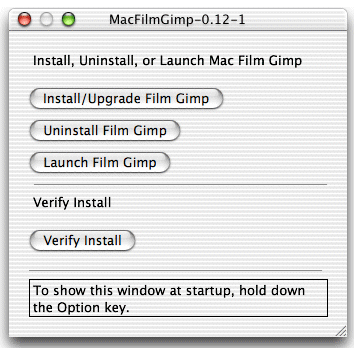
o If MacFilmGimp is still running, click the "Launch Film
Gimp" button
o Otherwise Double-click the MacFilmGimp icon.
Welcome to the distribution of Film Gimp.
Film Gimp is a motion picture editing tool primarily used for painting and retouching of movie images. Its application in feature movie productions includes the movies Scooby-Doo, Harry Potter, Stuart Little and Stuart Little 2. Film Gimp is the most successful open source tool in feature motion picture work today. Film Gimp is based on Gimp, the GNU Image Manipulation Program. Film Gimp is an independent project, separate from Gimp and GNU.
Important Film Gimp Notes:
o This version requires the Mac OS X Developer Tools. Install
the Developer.pkg package from the Developer Tools CD. Note that
the tools must match your Mac OS X version. On Darwin, the tools
should be present in the default install.
o This version of Film Gimp requires Mac OS X 10.2.
Apart from that, take a look at the Install.txt for directions on what to do.
More Information
You can find more information on the Film Gimp website at
http://www.filmgimp.org.
Questions and comments are best directed to the filmgimp-developer
mailing list at
http://sourceforge.net/mail/?group_id=57007
Intall gets even easier. Andy Prock has completed the MacFilmGimp automatic installer/launcher. This program installs Film Gimp if it isn't there and runs it if it is. No more starting Film Gimp from a terminal window. Click and go!
For informational purposes only. Don't use.
We're excited to have Mac users bringing fresh insights to what Film Gimp needs. Please pardon the wet paint.
Like all Fink-based X applications, you'll also need an XServer. OrborOSX is nice. Or, you can run 'fink install xfree86-rootless' to get XDarwin on your machine in your /Applications folder. You also have to install xfree86 via fink or from the XonX--xfree86 project.
To get install the Film Gimp menu in OrborOSX with the extra OroborOSX launch script:
Not only does it work from the Launch menu, it also works from the Dock. From the Dock it will start OroborOSX if it isn't running and launch filmgimp -- cool.